

Last updated October 19, 2026
This policy explains how customers of STF Works, LLC ("STF Works") consent to receive customer care text messages (SMS) and email notifications, what messages they will receive, and how to stop them at any time.
1. Program Description
| Program name | STF Works Customer Care Notifications |
|---|---|
| Sender | STF Works, LLC, 5424 Tory Hill Dr, Suite 1000, Greensboro, NC 27410 |
| Sending number | [1-888-789-7009] |
| Who receives messages | Current, active customers of STF Works products (Easy OFAC Checking, Easy Azure Entra, Fusion DB Connect, Intelligent Integration Server) who have opted in. |
| Message types | Support ticket confirmations and status updates, replies to customer-initiated support requests, scheduled maintenance and service notices, and license/account notifications. |
| Marketing | None. We do not send marketing or promotional text messages. |
| Message frequency | Varies based on support activity, typically 1–10 messages per month. |
| Cost | Message and data rates may apply. STF Works does not charge for these messages. |
2. How Customers Opt In
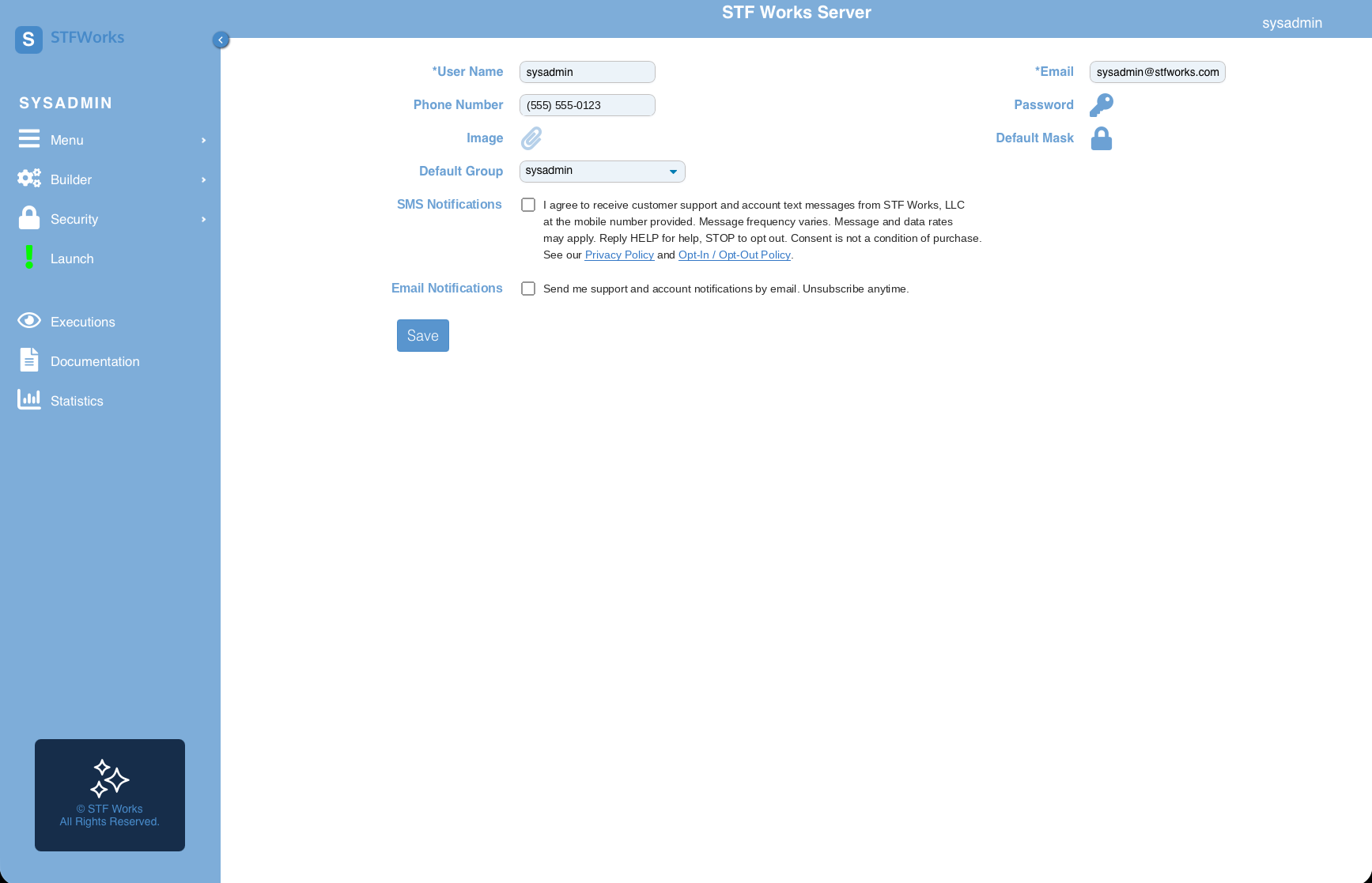
Text messaging is off by default. STF Works never enables SMS without the customer's own action. Consent is collected only through the customer's account profile:
- The customer signs in using Access My Account at stfworks.com.
- The customer opens their User Profile.
- The customer enters their mobile phone number.
- The customer checks the SMS consent box, which is unchecked by default, and saves their profile.
- STF Works sends a single confirmation text (shown below).
Consent language shown to the customer:
User profile opt-in setting:
Opt-in confirmation message:
3. Sample Messages
4. How to Opt Out
You can stop receiving messages at any time, using any of these methods:
- Text message: Reply STOP to any message. We also honor STOPALL, UNSUBSCRIBE, CANCEL, END, and QUIT.
- User profile: Sign in, open your User Profile, uncheck the SMS consent box, and save.
- Contact us: Ask to be removed through our Contact Us page.
After you reply STOP, you will receive one final confirmation and no further messages:
To opt back in, reply START or re-check the SMS consent box in your profile.
5. Help
Reply HELP to any message for assistance, or reach us through our Contact Us page.
6. Email Communication
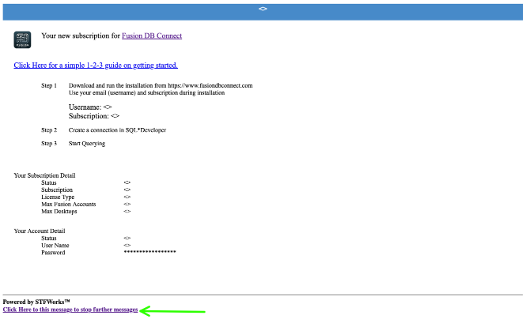
Email notifications are also off by default and are enabled in the same User Profile. Every email ends with a link to stop further messages: "Click here to stop further messages." You can also turn off email in your profile at any time.
7. Privacy
No mobile information will be shared with third parties or affiliates for marketing or promotional purposes. Text messaging opt-in data and consent will not be shared with any third parties, except service providers (such as our SMS delivery provider) that send messages on our behalf. See our Privacy Policy for details.
8. Carrier Disclaimer
Wireless carriers are not liable for delayed or undelivered messages.
9. Contact
STF Works, LLC
5424 Tory Hill Dr, Suite 1000
Greensboro, NC 27410
Contact Us